
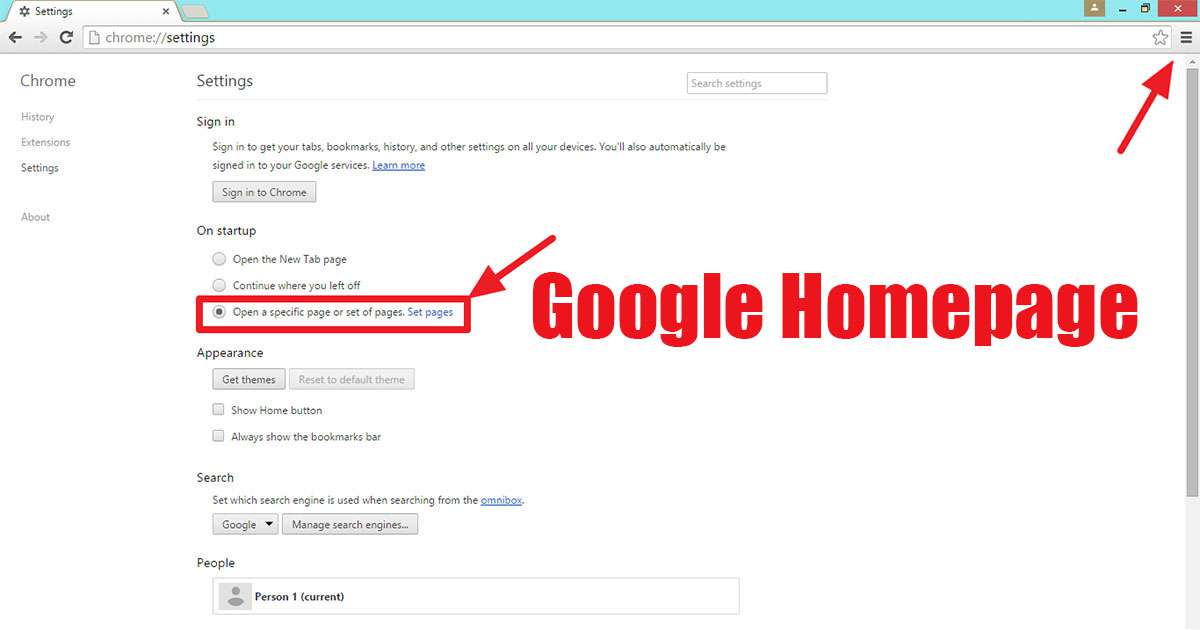
The google homepage is the first and central starting point that appears every time you open your internet browser. This page provides direct access to the world’s most powerful search engine, google, allowing you to instantly reach information news, current weather, your gmail email account your calendar and frequently used sites thereby enabling direct access to internet resources. It is vital to set the google search engine on the homepage. Because within seconds it filters the most relevant and reliable results from billions of web pages greatly speeding up and simplifying your process of learning, researching, shopping, travel planning or finding the answer to any question. If the homepage is not google it will be more difficult to access the correct results you are looking for so it is essential to set it.
To set google as your homepage with 2025 updates the most common method is to click on the three dots or lines menu in the upper right corner of your browser, go to settings then open the homepage option, select the a specific page option and enter https://www.google.com in the text box. Browsers like chrome, firefox and safari offer a one-click button while browsers like microsoft edge, opera and brave offer a drag-and-drop feature to set google directly as the homepage. Additionally applications or extensions that can be downloaded from google’s official site can automatically perform this process. Thus once you make this simple setting the search engine will be ready and waiting every time you open the browser.
To set the default search engine to google in google chrome follow these steps:
- Open chrome and click on the three-dot menu in the top right corner.
- From the dropdown list select the settings option.
- Click on the search engine tab in the left menu.
- Click on the drop-down menu under the title search engine used in the address bar.
- Select the google option from the list.
To set the default search engine to google in firefox follow these steps:
- Open firefox and click on the three-line menu in the top right corner.
- From the drop-down menu select the settings or options option.
- Click on the search tab from the menu on the left side.
- Click the dropdown menu under the default search engine heading.
- Select the google option from the list.
Alternative method via search bar …
- Click the search icon to the right of firefox’s address bar.
- Find the google option in the dropdown list.
- Click the make default button on the right.
The setting changes you made are saved automatically. Now every query you type into the address bar will be searched directly through google. If google does not appear in the list you can click on the manage other search engines option, add google and then set it as the default. After closing the settings you can immediately check if the process was successful by typing test into the address bar.
Other browsers are being changed in a similar way so I did not feel the need to write about all browsers.
Why is it so important to set the default search engine to google?
Setting your default search engine to google is very important for saving time accuracy and reliability in your internet usage. Because whenever you want to make a search you can either type your query directly into the address bar or click to instantly access google’s vast database. eliminating unnecessary steps like first going to the search site then typing the query and allowing you to reach the information you need within seconds. Google’s advanced algorithms prioritize the most up-to-date relevant , reliable sources related to your topic while also filtering out spam or misleading sites to protect your information security. In addition it maximizes your efficiency by providing personalized results such as news, local businesses weather based on your language, location and past searches.