

SolidWorks 2025 – What it is, what it does, how it comes into the world, and why on earth would you want one.
If you’ve ever looked over an engineer’s shoulder while they spin a 100% finished physical simulation 3D model of something that has absolutely no real world existence at the time and wondered ‘how on earth does that exist?!’ then there is a very strong possibility that SolidWorks was the thing that allowed that miracle.
Exactly what is it?
It’s a parametric solid modelling package. That means a very complicated name for a piece of software where you build things in three dimensions and where every single dimension, every relationship between different components, stays linked. If you change one feature in a design then every other feature that is linked to it will automatically update. It can guide a design right from a concept on a napkin through to an all-ready-for-production-design, all on your computer screen.
The advantage of doing that all on screen is pretty clear – a mistake discovered in the software is essentially free. A mistake discovered after you’ve cut tooling is an entirely different conversation! It can fully simulate what the real world will do. Stress loads and fluid dynamics and heat – it simulates it all before even one physical component is manufactured.
You see SolidWorks in almost every sector; automotive, aerospace, medical instruments, everyday consumer goods and industrial machinery-if it was engineered with a level of detail that is worth nothing less than a precise specification, SolidWorks was probably involved. While individual parts are just as important as assemblies comprising thousands of individual components, there are specialisations to be found in built-in sheet metal tools, mould designs and welded fabrication designs that one cannot find in a general-purpose CAD tool. Photorealistic renderings to meet the demands of a marketing team, PDM integration to avoid file versioning problems and team work going haywire; this is a full suite of capabilities.
Therefore SolidWorks is certainly more than just a 3D drawing tool; it is effectively a complete engineering environment.
So what is new in 2025?
It’s seems less a ” here are some more shinny new bits” kind of release, and more the kind where someone actually sat down to clear out the millions of small little irritating things users have been tolerating for years.
The largest single change for many will probably be the new default Z axis up. On the face of it a small issue but once youve spend time re-orienting models for 3d printing or CNC cutting this little change could appear to be revolutionary. Sheet Metal users will welcome the addition of automatic bend notches on flat patterns reducing the work required to get parts into production.
In the parts arena ‘Chamfer Selection Accelerators’ do what it says on the box cutting the time to add chamfers to multiple edges dramatically. The assembly arena also sees benefits in two key areas with Large Design Review working fully with collision detection and the ability to copy parts along with advanced/mechanical mates which should ease the development of large mechanisms enormously. There’s also a new option to check for interference on surface bodies for those using mixed modelling techniques.
Drawings are simplified in 2025 with an automatic tool to fix broken dimensions (everybody who’s taken over another designers mess knows what this is for). PDM integration has also been improved so that file management can take place entirely within the application rather than having to pop between two programs.
How to download it ?
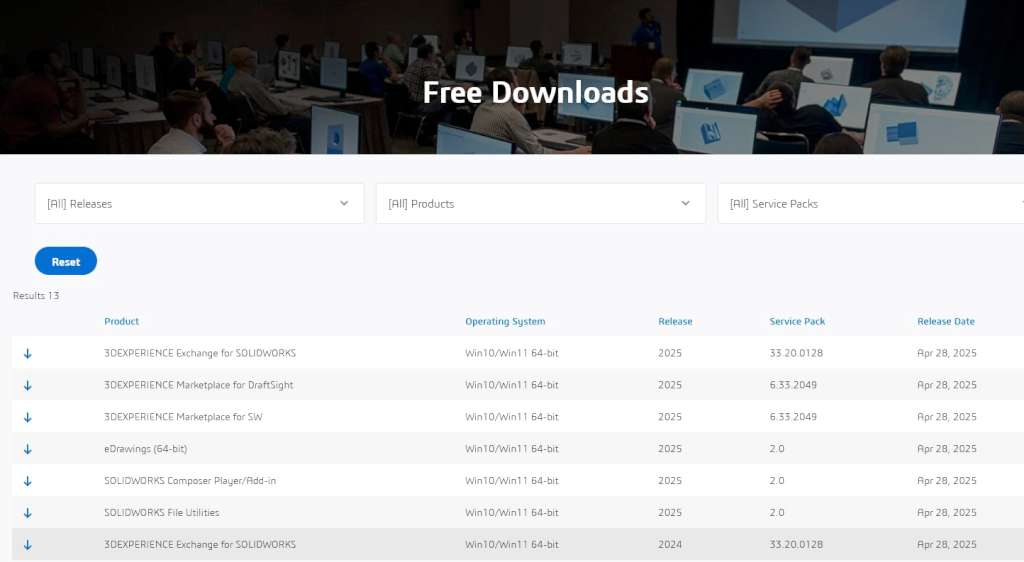
Simply go to the SolidWorks Downloads page, locate what you are looking for and hit the download button to the right. The downloads are free, although installation require a license key so get that sorted first.
What is currently on this page:
- 3DExperience Exchange for SolidWorks – 2024, 2025, 2026
- 3DExperience Marketplace for DraftSight – 2024, 2025, 2026
- 3DExperience Marketplace for SW – 2024, 2025, 2026
- eDrawings 64-bit – 2026
- SolidWorks Composer Player / Add-in – 2026
- SolidWorks File Utilities – 2026
- SolidWorks PCB Viewer – 2023
Although the list above represents what is currently downloadable from that page, it’s slightly misleading if you have actually purchased the software. The real installer will download as one file which, being the complete software package with all of the libraries and add-ons, is a chunky 25 Gigs in size. Furthermore, the installer is an intelligent beast. It first scans your system and downloads anything it will require from SolidWorks’ servers, e.g.,SQL Server or .NET Framework, and installs it for you. It even takes care of setting the Z-axis orientation, templates, etc during installation, so you do not spend hours setting basic things up.
Honestly, the licensed way of obtaining this software, if your work depends on it, is In my honest opinion, for anyone who has to work seriously with this software the licensed route is definitely the way to go. The individual download’s on the page above are all useful individually, but the one full installer package is so much more streamlined, and it does all the necessary components.
Finally, I should say that SolidWorks is not something that you can sit down with for an hour or two and work out the basics, there is a very steep learning curve with the system, however for anyone whose work involves high precision engineering, it is worth the time investment.